
WhatsApp Web, in your language — without leaving the chat.
TrasChat is a Chrome extension that translates WhatsApp Web in real time: a side panel translates incoming messages and your replies, without covering the original chat.
Free account to start · plans from $5/mo.
How it works
Install the extension
Add TrasChat to Chrome from the Chrome Web Store. Takes less than a minute.
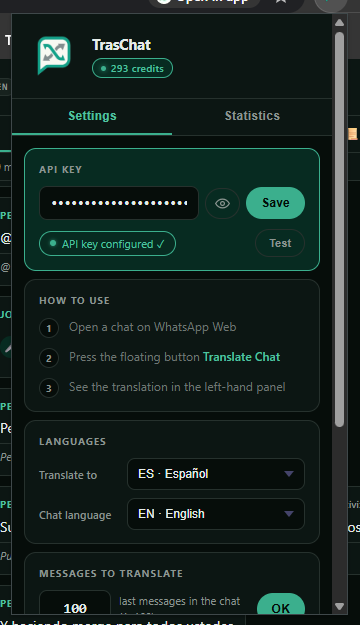
Connect your API key
Create your account, generate a key in the dashboard, and paste it into the extension.
Chat in your language
Every WhatsApp Web message is translated automatically, in real time.
What the panel looks like
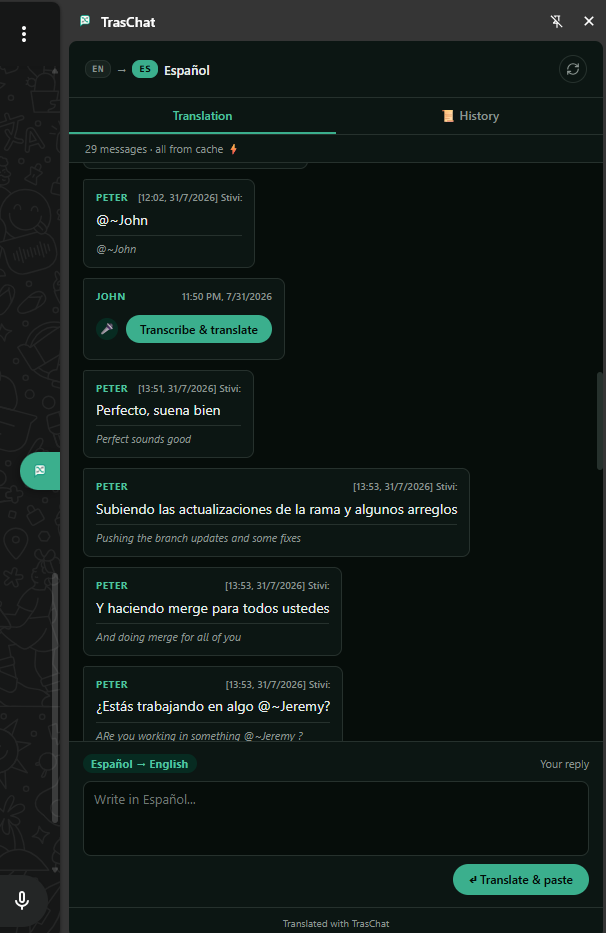
The original chat stays intact on WhatsApp Web; the panel translates live and lets you reply in your own language.
Videos
See TrasChat translating WhatsApp Web in real time, voice notes included.


Features
Sorted by what matters most: reading and replying without leaving the chat, both ways.
Live chat translation
The side panel translates the latest messages and keeps translating new ones as they arrive, while the original chat stays right there, intact and interactive.
Translate and paste
Write your reply in your own language — typos, missing accents, or messy punctuation and all. The AI translates by meaning, not word-for-word, so it still gets what you meant, and pastes it into WhatsApp's text box already cleaned up in the other person's language.
Voice notes, transcribed in your browser
Whisper runs locally: audio never leaves your machine. It's transcribed right there and then translated.
Group chats, no mixed-up messages
Every sender is identified in the translation, message by message.
Translation cache
A message translated once won't spend credits again.
Per-chat history
A dedicated panel to review past translations for each conversation.
Message privacy
Text is sent temporarily just to translate it; it isn't stored as plain text on the server beyond the credit-usage log.
Ready to try it?
Sign up free and translate 800+ messages — your first registration includes 1,000 bonus credits, one-time only.
Create free accountChoose how much you want to translate
1 credit is roughly 100 translation tokens. Start free and upgrade whenever you need to, no lock-in.
- Translate in all 11 supported languages
- Voice notes transcribed automatically
- No card, no commitment
- Try it out, no commitment
- Covers daily use for a single person
- One-time top-up available if you run out
- The recommended middle ground
- Built for daily work use
- One-time top-up available if you run out
- For heavy or team use
- Higher volume, same price per credit
- One-time top-up available if you run out
Ran out of credits before renewal? Buy a one-time top-up of 1,000 credits for $1 without changing plans. Fully automatic via PayPal, right from the dashboard.
Frequently asked questions
Do I need anything besides the extension?
Yes: an account on the web dashboard and your own API key, which you generate after signing up and paste into the extension.
Is it available on the Chrome Web Store?
Yes, it's already published on the Chrome Web Store — install it in one click, no developer mode needed.
What happens to my messages?
They're sent temporarily to the AI provider just to translate them; they aren't stored as plain text on the server beyond the credit-usage log.
What about voice notes?
They're transcribed right in your own browser — audio is never uploaded to any server — and then translated.
How do I add credits?
Pick a monthly plan (credits are added automatically every month via PayPal) or buy a one-time top-up of 1,000 credits whenever you need it — both options live in the dashboard, under /recargas.
How is this different from WhatsApp's built-in translation?
WhatsApp's native translation handles text messages, but it doesn't transcribe voice notes locally and isn't built for juggling several languages across multiple conversations at once. TrasChat translates up to 11 languages, transcribes voice notes right in your browser (the audio never leaves your device), and works well for support teams handling many chats at the same time.
Is voice note transcription better than WhatsApp's own transcription?
TrasChat runs Whisper locally in your browser to transcribe voice notes before translating them, instead of relying on WhatsApp's built-in transcription or uploading audio to an external server.
Do I need to write my reply perfectly for it to translate correctly?
No. The AI translates by meaning, not word-for-word — even if your reply has typos, missing punctuation, or bad grammar, the translation that gets pasted into WhatsApp comes out clean in the other person's language.
Start translating today
Create your free account, generate your API key, and connect it to the extension.
Create account